
How to disable Network Manager on Linux
Last updated on November 26, 2020 by Dan Nanni
Network Manager is a feature-rich network configuration service which is used by default in most Linux desktop environments nowadays. It provides automatic configuration of (wired/wireless) network interfaces, as well as VPN, mobile broadband and even Bluetooth connections. Network Manager is smart enough to automatically switch to the best (or the most recent) connection network, and can inform other applications of up-to-date network events via D-Bus API.
While Network Manager comes with various sophisticated features, you might just prefer the old plain network service. There could be several reasons to do so. For one, you may wish to have more control over network management, instead of relying on purely automatic configuration and switch-over, which may or may not suit your needs. Besides, Network Manager is not suitable for advanced networking setup, such as multi-homing to more than one wired connections, forwarding network traffic, configuring Linux bridge or aliases, etc.
In general, Network Manager is designed to keep a typical end-user Linux box connected at all times with the best possible connection with minimum intervention by users. If such automation is not needed in your Linux environment, you can turn off Network Manager.
This tutorial describes how to disable Network Manager in various Linux desktop environments. Be careful if you are trying to disable Network Manager on a remote host, as you will lose connectivity if you fail to set up its networking correctly in some other means.
Check Which Network Interfaces are Managed by Network Manager
To check if Network Manager is managing any network interface, you can use nmcli, which is a command line utility that comes with Network Manager.
$ nmcli dev status
DEVICE     TYPE              STATE
eth1      802-3-ethernet   connected
eth0      802-3-ethernet   connected
The above command will list all existing network interfaces along with their STATE. If STATE is shown as unmanaged, this means Network Manager is not controlling a corresponding interface. If STATE displays any other values (e.g., connected), it implies that a given interface is managed by Network Manager.
Disable Network Manager Completely
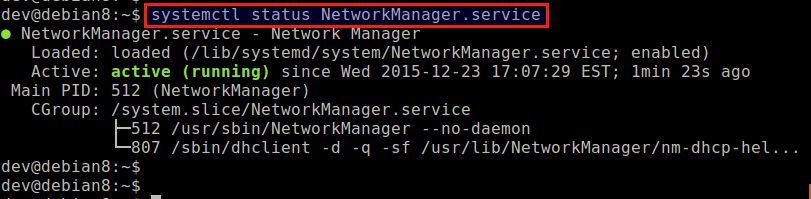
Here is how to disable Network Manager completely, so that Network Manager stops running on your Linux system.
Disable Network Manager on Debian 8 or later
$ sudo systemctl stop NetworkManager.service
$ sudo systemctl disable NetworkManager.service
Disable Network Manager on Debian 7 or earlier
$ sudo /etc/init.d/network-manager stop
$ sudo update-rc.d network-manager remove
Disable Network Manager on Ubuntu or Linux Mint
$ sudo stop network-manager
$ echo "manual" | sudo tee /etc/init/network-manager.override
After disabling Network Manager on Debian or Ubuntu, use /etc/network/interfaces to configure network interfaces.
Disable Network Manager on Fedora or CentOS/RHEL 7 or later
$ sudo systemctl stop NetworkManager.service
$ sudo systemctl disable NetworkManager.service
Disable Network Manager on CentOS/RHEL 6 or earlier
$ sudo service NetworkManager stop
$ sudo chkconfig NetworkManager off
After disabling Network Manager on Fedora or CentOS, use /etc/sysconfig/network-scripts/ifcfg-[X] files to configure network interfaces.
Disable Network Manager for a Particular Network Interface on Debian, Ubuntu or Linux Mint
To disable Network Manager only for eth1 on Debian, Ubuntu or Linux Mint, you can do the following.
First, open the Network Manager configuration file in /etc/NetworkManager with a text editor, and set managed=false, typically shown under [ifupdown].
$ sudo vi /etc/NetworkManager/NetworkManager.conf
[ifupdown]
managed=false
Then in /etc/network/interfaces, add information about the interface you want to disable Network Manager for. In this example, the interface is eth1, and we are using static IP configuration.
$ sudo vi /etc/network/interfaces
# The loopback network interface
auto lo
iface lo inet loopback

# network interface not managed by Network Manager
allow-hotplug eth1
iface eth1 inet static
address 10.0.0.10
netmask 255.255.255.0
gateway 10.0.0.1
dns-nameservers 8.8.8.8
Then Network Manager automatically ignore any interfaces specified in /etc/network/interfaces, and stop managing them.
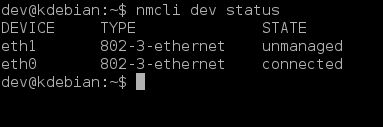
After rebooting, verify that Network Manager is successfully disabled for eth1.
$ nmcli dev status
Disable Network Manager for a Particular Network Interface on Fedora or CentOS/RHEL
The following steps will disable Network Manager for eth1 on Fedora, CentOS or RHEL.
Create an interface configuration file for eth1 (if not exist), and add NM_CONTROLLED=no.
TYPE="Ethernet"
NAME="eth1"
BOOTPROTO="static"
IPADDR=10.0.0.10
NETMASK=255.255.255.0
GATEWAY=10.0.0.1
HWADDR="00:90:29:95:EA:57"
ONBOOT="yes"
DEFROUTE="yes"
NM_CONTROLLED=no
Now enable network service so that eth1 is activated by network service automatically upon boot.
On Fedora or CentOS/RHEL 7 or later:
$ sudo systemctl enable network.service
On CentOS/RHEL 6 or earlier:
$ sudo chkconfig network on
Upon rebooting, verify that Network Manager is successfully disabled for eth1 with nmcli command.
$ nmcli dev status
Support Xmodulo
This website is made possible by minimal ads and your gracious donation via PayPal or credit card
Please note that this article is published by Xmodulo.com under a Creative Commons Attribution-ShareAlike 3.0 Unported License. If you would like to use the whole or any part of this article, you need to cite this web page at Xmodulo.com as the original source.

Xmodulo © 2021 ‒ About ‒ Write for Us ‒ Feed ‒ Powered by DigitalOcean