
How to monitor power usage in Linux
Last updated on October 26, 2020 by Dan Nanni
It is important to measure power consumption in operating system especially when you try to maximize the battery life of your laptop, or reduce the energy bill of rack-mounted servers in a data center. Power usage monitor can also be helpful to diagnose issues with power management, or even buggy behaviors of applications.
In this post, I will describe how to monitor power usage in Linux operating system.
For Linux-based systems, you can use PowerTop, an ncurses-based command-line tool developed by Intel to monitor process-level power consumption, and to provide suggestions to optimize power management. PowerTop supports Intel, AMD, ARM, and UltraSparc processors while it is the most reliable on Intel processors for the obvious reason.
Install PowerTop on Linux
Install PowerTop on Ubuntu or Debian
$ sudo apt-get install powertop
Install PowerTop on CentOS, Fedora or RHEL
$ sudo yum install powertop
Run PowerTop
To launch PowerTop, simply run:
$ sudo powertop
Once PowerTop is launched, you can press left/right arrow keys to navigate tab-based UI. PowerTop can start reporting power estimates after it has collected enough measurements, which can take a couple of minutes. Previous measurements are stored in /var/cache/powertop, and will be loaded upon subsequent PowerTop launch.
In Tunables menu, you can experiment with various power management settings in case some tunable parameters are not enabled on your Linux distribution.
For offline analysis, PowerTop allows you to export power monitoring results to csv or html format as follows.
$ sudo powertop --csv=output.csv
$ sudo powertop --html=output.html
To get more accurate estimates, you can run PowerTop in calibration mode as follows. The entire calibration process can take a couple of minutes. During calibration, PowerTop can disconnect your system from WiFi, adjust screen brightness, and generate USB device activities.
$ sudo powertop --calibrate
Loaded 27 prior measurements
Starting PowerTOP power estimate calibration
Calibrating idle
Calibrating: disk usage
My (0) time 14986258702 is not the same as child (0) time 15395089845
Calibrating backlight
.... device /sys/class/backlight/intel_backlight/brightness
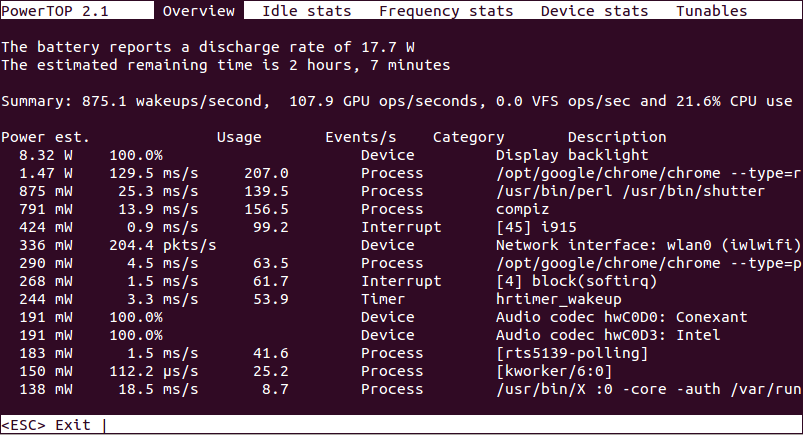
The screenshots of PowerTop are shown below.
PowerTop Overview
PowerTop Idle Stats

PowerTop Frequency Stats

PowerTop Device Stats

PowerTop Tunables

HTML Report Generated by PowerTop

Support Xmodulo
This website is made possible by minimal ads and your gracious donation via PayPal or credit card
Please note that this article is published by Xmodulo.com under a Creative Commons Attribution-ShareAlike 3.0 Unported License. If you would like to use the whole or any part of this article, you need to cite this web page at Xmodulo.com as the original source.

Xmodulo © 2021 ‒ About ‒ Write for Us ‒ Feed ‒ Powered by DigitalOcean