
How to speed up slow apt-get install on Debian or Ubuntu
Last updated on December 5, 2020 by Dan Nanni
If you feel that package installation by apt-get (apt) or aptitude is often too slow on your Debian or Ubuntu system, there are several ways to improve the situation. Have you considered switching default mirror sites being used? Have you checked the upstream bandwidth of your Internet connection to see if that is the bottleneck?
Nothing else, you can try this third option: use apt-fast tool. apt-fast is actually a shell script wrapper written around apt-get and aptitude, which can accelerate package download speed. Internally, apt-fast uses aria2 download utility which can download a file in chunked forms from multiple mirrors simultaneously (like in BitTorrent download).
Install apt-fast on Ubuntu or Debian
Here are the steps to install apt-fast on Debian-based Linux.
On Debian:
$ sudo apt-get install aria2
$ wget https://github.com/ilikenwf/apt-fast/archive/master.zip
$ unzip master.zip
$ cd apt-fast-master
$ sudo cp apt-fast /usr/bin
$ sudo cp apt-fast.conf /etc
$ sudo cp ./man/apt-fast.8 /usr/share/man/man8
$ sudo gzip /usr/share/man/man8/apt-fast.8
$ sudo cp ./man/apt-fast.conf.5 /usr/share/man/man5
$ sudo gzip /usr/share/man/man5/apt-fast.conf.5
On Ubuntu 14.04 and higher:
$ sudo add-apt-repository ppa:saiarcot895/myppa
$ sudo apt-get update
$ sudo apt-get install apt-fast
On Ubuntu 11.04 to 13.10:
$ sudo add-apt-repository ppa:apt-fast/stable
$ sudo apt-get update
$ sudo apt-get install apt-fast
During installation on Ubuntu, you will be asked to choose a default package manager (e.g., apt-get, aptitude), and other settings. You can always change the settings later by editing a configuration file /etc/apt-fast.conf.
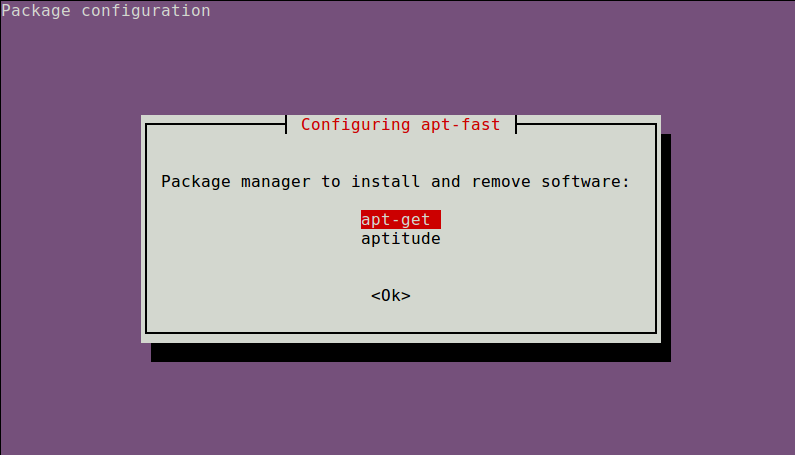
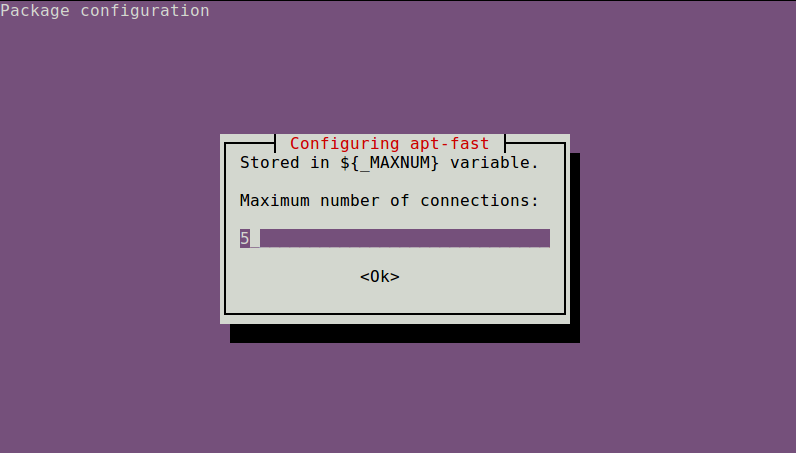

Configure apt-fast
After installation, you need to configure a list of mirrors used by apt-fast in /etc/apt-fast.conf.
You can find a list of Debian/Ubuntu mirrors to choose from at the following URLs.
After choosing mirrors which are geographically close to your location, add those chosen mirrors to /etc/apt-fast.conf in the following format.
$ sudo vi /etc/apt-fast.conf
Debian:
MIRRORS=('http://ftp.us.debian.org/debian/,http://carroll.aset.psu.edu/pub/linux/distributions/debian/,http://debian.gtisc.gatech.edu/debian/,http://debian.lcs.mit.edu/debian/,http://mirror.cc.columbia.edu/debian/')
Ubuntu/Mint:
MIRRORS=('http://us.archive.ubuntu.com/ubuntu,http://mirror.cc.columbia.edu/pub/linux/ubuntu/archive/,http://mirror.cc.vt.edu/pub2/ubuntu/,http://mirror.umd.edu/ubuntu/,http://mirrors.mit.edu/ubuntu/')
As shown above, individual mirrors for a particular archive should be separated by commas. It is recommended that you include the default mirror site specified in /etc/apt/sources.list in the MIRRORS string.
Install a Package with apt-fast
Now you are ready to test the power of apt-fast. Here is the command-line usage of apt-fast:
apt-fast [apt-get options and arguments]
apt-fast [aptitude options and arguments]
apt-fast { { install | upgrade | dist-upgrade | build-dep | download  | source  } [ -y | --yes | --assume-yes | --assume-no ]   ... | clean }
To install a package with apt-fast:
$ sudo apt-fast install texlive-full
To download a package in the current directory without installing it:
$ sudo apt-fast download texlive-full

As mentioned earlier, parallel downloading of apt-fast is done by aria2. You can verify parallel downloads from multiple mirrors as follows.
$ sudo netstat -nap | grep aria2c
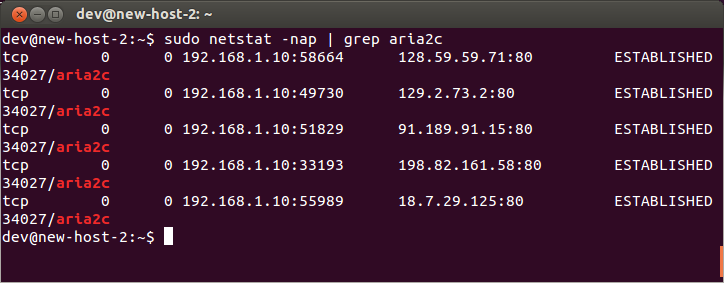
Note that apt-fast does not make apt-get update faster. Parallel downloading gets triggered only for install, upgrade, dist-upgrade and build-dep operations. For other operations, apt-fast simply falls back to the default package manager apt-get or aptitude.
How Fast is apt-fast?
To compare apt-fast and apt-get, I tried installing several packages using two methods on two identical Ubuntu instances. The following graph shows total package installation time (in seconds).

As you can see, apt-fast is substantially faster (e.g., 3--4 times faster) than apt-get, especially when a bulky package is installed.
Be aware that performance improvement will of course vary, depending on your upstream Internet connectivity. In my case, I had ample spare bandwidth to leverage in my upstream connection, and that's why I see dramatic improvement by using parallel download.
Support Xmodulo
This website is made possible by minimal ads and your gracious donation via PayPal or credit card
Please note that this article is published by Xmodulo.com under a Creative Commons Attribution-ShareAlike 3.0 Unported License. If you would like to use the whole or any part of this article, you need to cite this web page at Xmodulo.com as the original source.

Xmodulo © 2021 ‒ About ‒ Write for Us ‒ Feed ‒ Powered by DigitalOcean